
Driving Licence Verification: How to Validate DL Details Instantly for KYC & Business Use
Verify Driving Licence details for KYC and business onboarding. Learn about DL status, validity, vehicle categories, RTO details, and more.
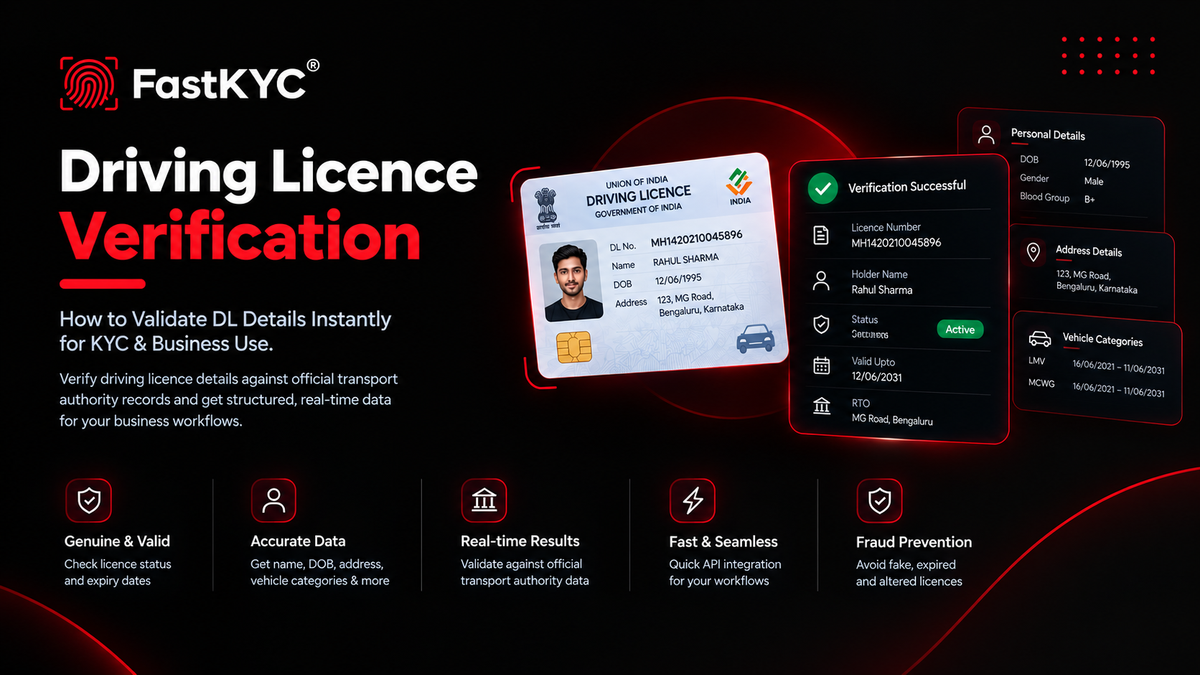
A Driving Licence (DL) is one of India’s widely accepted photo identity and address proof documents. Issued by Regional Transport Offices (RTOs) under the Motor Vehicles Act, it contains important information about the licence holder, including name, date of birth, address, vehicle categories authorised, validity periods, and licence status.
For businesses, simply accepting a scanned or uploaded copy is no longer enough. Manual checks can be slow, error-prone, and vulnerable to forged or expired documents. Driving Licence verification helps businesses validate a DL number against authorised transport records and retrieve structured information for use in onboarding, KYC, lending, logistics, and compliance workflows.
What Is a Driving Licence Number?
An Indian Driving Licence number generally follows a structured format that can include the state code, RTO code, year of issue, and a unique licence number. Examples include:
- GJ04 20120005008
- MH1420210045896
- MH0220250045678
The number uniquely identifies the licence record maintained by the relevant RTO or state transport department. Depending on the verification process, the DL number may be used along with additional information such as the date of birth to retrieve the licence details.
What Is Driving Licence Verification?
Driving Licence verification is the process of validating a DL number against authorised transport records and retrieving the associated licence and holder information in a structured format.
Instead of relying only on a physical card, image, or self-declared information, a verification service can retrieve available licence details.
This allows businesses to validate licence information and use the results directly in digital onboarding, KYC, compliance, and decision-making workflows.
Why Businesses Need Driving Licence Verification
Businesses may collect Driving Licences for identity verification, address verification, age verification, and professional eligibility, particularly for roles involving driving or transportation.
Manual verification can result in:
- Accepting expired or invalid licences
- Processing forged or altered documents
- Manual data-entry errors
- Delays in high-volume onboarding
- Inconsistent verification processes
- Compliance and audit challenges
Automated DL verification helps organisations:
- Validate licence details more efficiently
- Check licence status and validity
- Retrieve accurate holder and vehicle-category information
- Reduce fraud during customer or driver onboarding
- Speed up KYC and due-diligence processes
- Maintain a record of verification results for audit purposes
Key Use Cases
Lending & NBFCs
Verify identity and address information during loan applications and customer onboarding.
Logistics, Mobility & Ride-Hailing
Confirm that drivers have valid licences and the required vehicle categories or transport authorisations.
Insurance
Use verified licence information during policy issuance, underwriting, and claims-related processes.
Staffing & HR
Verify driving credentials for employees and candidates whose roles require a valid Driving Licence.
Banking & Fintech
Use DL verification as part of customer onboarding and identity verification workflows.
Marketplaces & E-commerce
Verify delivery partners, sellers, or other users whose activities require driving credentials.
Real Estate & Rentals
Use DL information as part of tenant or customer identity verification.
Digital KYC
Use Driving Licence verification as one of the identity verification checks in a broader KYC workflow.
What Information Does Driving Licence Verification Return?
The exact response depends on the data source and the depth of verification. A comprehensive response may include the following categories.
Core Licence Details
- Licence number and previous licence number, where available
- Licence status
- Issue date
- Issuing authority or RTO
- State and state code
- RTO name and code
- RTO office details, where available
- Non-transport validity period
- Transport validity period
- Endorsement details
- Application numbers, where available
Personal & Biographical Details
- Full name
- First, middle, and last name
- Date of birth
- Gender
- Blood group
- Father's or dependent's name and relationship
- Citizenship information, where available
- Organ donor status, where available
- Aadhaar authentication status, where available
Address Information
Depending on the response, address details may include:
- Permanent address
- Present or temporary address
- Address lines
- District
- State
- Pincode
- Locality type, such as Urban or Rural
Vehicle Categories (Classes of Vehicles or COVs)
Vehicle categories indicate the types of vehicles the licence holder is authorised to drive. Depending on the response, these may include:
- COV abbreviation
- Full vehicle category description
- Category type, such as Non-Transport (NT) or Transport (TR)
- Issue date
- Endorsement date
- Category status
- Badge details, where applicable
For example:
- LMV – Light Motor Vehicle
- MCWG – Motor Cycle With Gear
- TRANS – Transport Vehicle
Additional & Historical Data
More comprehensive responses may also contain:
- Transaction history
- Renewal details
- Additional endorsements
- NOC-related information
- PSV badge information
- Profile image, where available
- Signature, where available
- Photo or biometric capture dates
- Print and dispatch status
Simpler Response Formats
Some verification responses may provide a smaller set of fields, such as:
- Licence status
- Holder name
- Date of birth
- Non-transport validity
- Transport validity
- Vehicle categories
- Address
- Pincode
- Gender
- Blood group
- Dependent name
- RTO information
The exact fields available depend on the underlying data source and verification response.
How Driving Licence Verification Works via API
A typical DL verification workflow works as follows:
- The application collects the customer's Driving Licence number.
- The application sends the DL number, and any required additional information, to the verification service.
- The verification service retrieves the available licence information from an authorised data source.
- A structured response is returned with the available verified details.
- The business uses the response for onboarding, decision-making, risk assessment, compliance, or audit purposes.
This approach reduces dependency on manual document inspection and allows DL verification to become part of an automated KYC or business verification workflow.
- DL Verification
- Licence Status
- Licence Validity
- Driver Onboarding